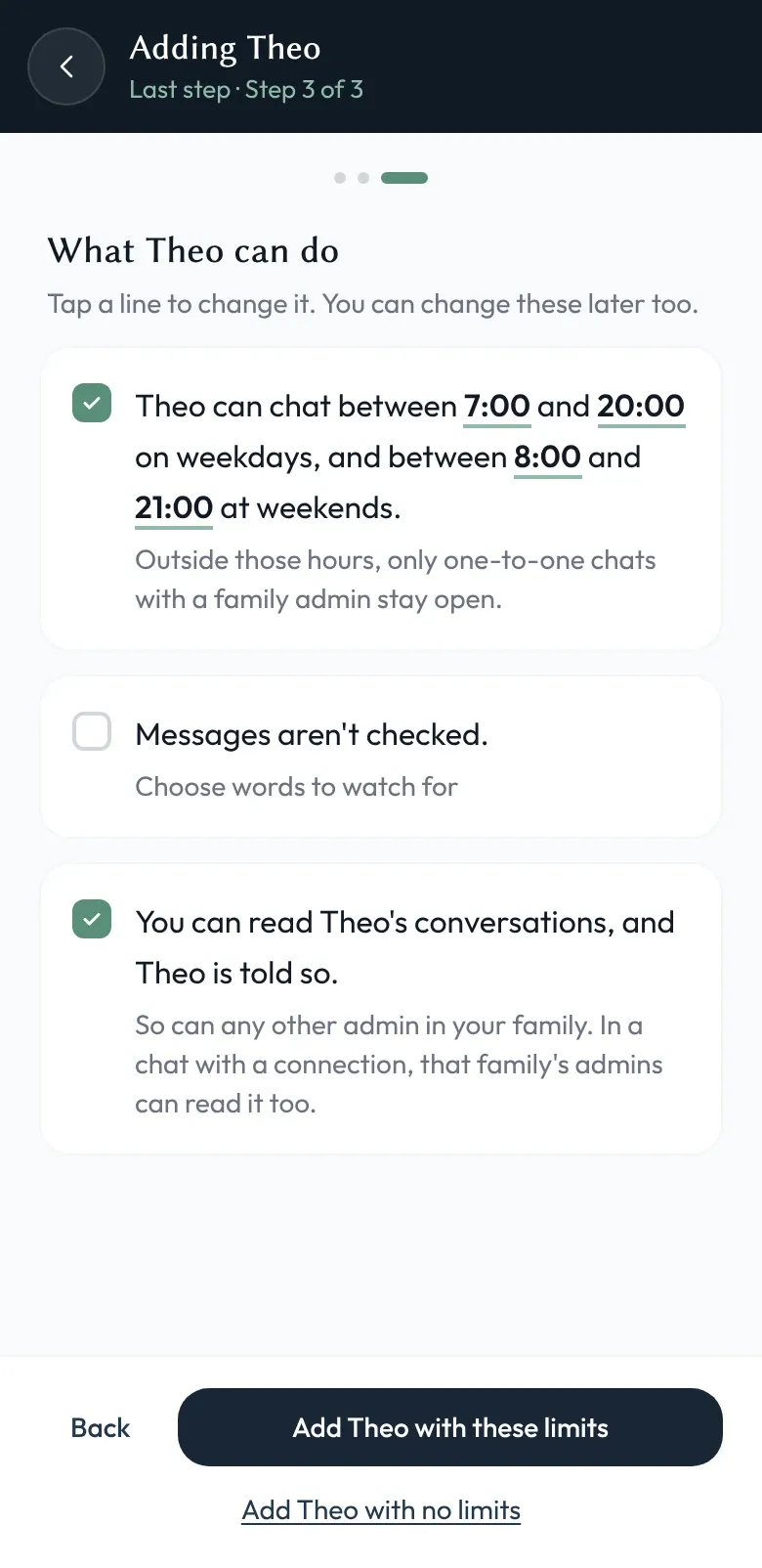
Updated October 2026: Children no longer join with a QR code or pairing link: an admin adds them, and they pick themselves on a family device. New children now start on the Cove skin with active hours switched on (7am–8pm on weekdays, 8am–9pm at weekends), which you can change.
Adding a child to a family shouldn’t require giving a young person an email address, an account on a grown-up platform, and a password they’ll forget by Tuesday. In Shoal it’s a short flow, and we recently rebuilt it so the decisions a parent actually cares about happen up front, in one place, before the child is ever live.
No email, by design
A family admin adds a child by name — there’s no invitation to an inbox. The child then uses Shoal on a family device, tapping their own name to start: no email account to create, no username to remember, nothing handed to a young child that could be used to sign up for the rest of the internet.
Three steps, one decision each
The old flow created the child first and left you to find the settings afterwards, which meant the safety choices were the easiest ones to skip. The new flow is a small stepper that asks one kind of thing at a time: first identity — who this is and what they’re called; then personalisation — their interface skin and bubble colour, the bits that make it feel like theirs; then governance — their active hours and moderation, the rules that quietly look after them.
Putting governance in the setup flow means the calm decisions get made calmly, at the start, rather than in a hurry after something’s already gone sideways.
Set once, applied as one
Behind the scenes, everything you choose in those three steps is applied together, as a single transaction — the child’s identity, their personalisation, and their rules either all take effect or none do. There’s no in-between state where a child exists but their active hours haven’t landed yet.
Some honest limits
A child’s access lives on the family devices you’ve set up, which is the point — but it does mean looking after those devices is part of looking after the account. Everything you set at creation is editable later from the family settings; the stepper is there to make the first run thorough, not final. And these are tools for a family setting up its own children, run by the adults the controls are meant to help.
How this fits with everything else
A child set up this way is a full member: they appear in conversations, they’re covered by admin oversight, and their personalisation and rules are the same ones described across the feature pages. The security page covers how pairing and family membership are secured.
Try Shoal, add your shoal, and tell us where the flow snags at hello@shoal.chat.